iGPSPORT BSC300 Review: Display, Sensors, Waterproofing and Verdict
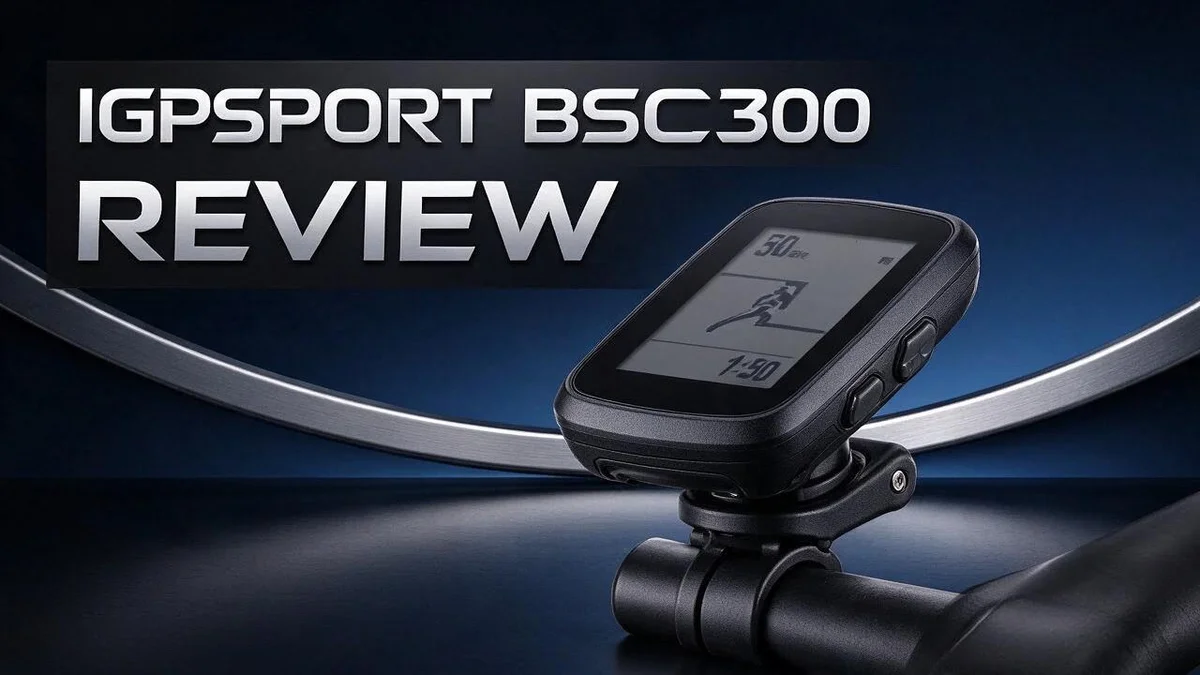
Are you looking for a bike computer that just works? The iGPSPORT BSC300 could be the answer. It packs strong features into a compact design that fits most handlebars.
Here is what stands out right away. The 2.4 inch screen shows your time, altitude, and calories. The backlit display keeps these numbers easy to read on early morning or late evening rides.
Built-in GPS tracks your route from start to finish. The 8 GB of memory stores your past rides for later review. The unit also connects to speed, cadence, and power sensors each time you head out.
Want a companion for rainy days? This model carries an IPX7 waterproof rating. Your gear stays protected when the weather turns.
In a Nutshell
-
Sensor friendly setup: The BSC300 works with speed, cadence, speed and cadence, and power sensors. It connects automatically at every ride start, so there is less setup time before each ride.
-
Plenty of storage: The unit includes 8 GB of built-in memory. Your rides stay saved for later review, which suits riders who log many miles.
-
Battery for longer outings: A 600 mAh battery powers the computer. Charge it before long trips because battery size matters most on extended rides.
-
Touchscreen upgrade: The BSC300T adds a 2.4 inch touchscreen. It also brings offline map navigation and wireless features, which help riders on unfamiliar roads.
-
Electric bike and camera support: The BSC300T works with electric bikes and Insta360 cameras. Electric bike riders can use the same device, which makes it useful beyond road cycling.
-
Strong competitors nearby: Many riders compare it with the Cuso CS300 and the Garmin Edge 1030. Wahoo and Garmin remain the main brands to consider, and comparing options helps you pick the right match.
Display and Readability

- 【Large Screen】The BSC300T wireless bike computer equipped with a 2.4'' touch screen and 6 buttons, allowing you...
- 【Multiple Modes】Not only suitable for road bikes and mountain bikes, but also supports Ebike and can display...
Last update on 2026-11-26 / Affiliate links / Images from Amazon Product Advertising API
Good display and readability can make or break a ride. You glance down at your handlebars for only a second or two. Clear text helps you read data fast.
The BSC300 uses a 320×240 resolution screen. That pixel count keeps text and numbers sharp at a glance. Simple layouts work best on this compact unit.
The backlit screen helps in low light. Early morning rides and evening commutes feel easier. You do not need to squint at the numbers.
Bright sunshine can still cause glare. Tilting the mount a little often improves the view. Try a few angles before your first long ride.
Think about which numbers matter most on each outing. Focusing on a few key readings keeps your eyes on the road. Less clutter means quicker reading.
Mounting height matters too. A position near your stem keeps the screen in your natural line of sight. Less head movement means fewer distractions.
The BSC300T adds a touchscreen for direct input. Touch controls can reduce button presses on the trail. Wet or gloved hands may affect touch response, so test it first.
Offline maps bring another readability boost. Zoom and pan let you spot turns quickly. A clear route view saves time at busy junctions.
Long rides test endurance for your eyes. A clean, readable display reduces strain over several hours. Comfort grows with every mile.
Riders who commute daily will notice the difference most. Quick glances at speed and time keep the ride smooth. Good readability supports steady pacing.
Clear display habits lead to safer rides. Practice reading the screen while pedaling in a quiet area. You will feel more confident on busy roads.
Readability depends on your riding style and lighting. Test the screen in your own conditions. A little practice goes a long way.
Sensor Compatibility and Setup
Setting up sensors can feel like the hardest part of owning a bike computer. The good news is that the BSC300 keeps the process fairly simple.
Pair your sensors before the first ride. Mount each sensor on the bike, then turn on the computer and let it search. Once it finds them, the connection stays saved for future trips.
Think of it as a one time setup. After that, the unit connects automatically when you begin a ride. You simply roll out and let the device do the work.
Check sensor alignment after every bike move. Speed and cadence readings depend on a clean signal. A loose magnet or a bent tab can cause missing data.
Keep batteries fresh in your sensors too. Weak sensor batteries often cause dropped readings. Swap them when numbers start to jump or freeze.
Mix and match sensors with care. Some riders run a separate speed sensor and cadence sensor. Others prefer one combined unit on the crank. Choose the setup that fits your bike and your habits.
Power meters need a bit more attention. Calibrate the meter if the manufacturer recommends it. Good calibration keeps your power numbers accurate over many weeks.
Test everything in your driveway. Ride a few minutes around the block before a long trip. This quick check catches problems while they are still easy to fix.
If the BSC300 does not find a sensor, restart both devices. Move away from other bike computers nearby, since signals can overlap. Then try the search again.
Keep your sensor list organized. If you swap bikes, remove the old sensors from the menu. A clean list speeds up pairing and avoids confusion on the trail.
Pairing works best when the computer sits near your bike during setup. Keep your phone and other gadgets away for a moment. Clear signals mean faster and more reliable connections.
Waterproofing and Durability
Wet weather tests every bike computer. Mud, spray, and sudden storms can damage weak gear. Good build quality helps you keep your data flowing.
Think of waterproofing as a safety net, not a dare. Dunking the unit in a lake or blasting it with a high pressure hose is a different story. Gentle rinsing after muddy rides keeps grit out of the seams.
Check the mount after every hard ride. Vibration on rough roads can loosen screws and clips. A loose mount may let water slip in around the edges, so a quick tug test saves trouble later.
Before a long trip, check every seal and rubber cover on the unit. Dirt or a small tear can let moisture reach the internal parts. Replace worn parts quickly to keep the device protected.
Cold weather adds another challenge. Most small batteries lose some power in freezing temperatures. Keep the unit warm inside your jacket during the first chilly minutes.
Heat matters just as much. Leaving the computer in a hot car or direct sunshine can wear down the battery over time. Store it in the shade or indoors after each ride.
Clean the screen with a soft microfiber cloth. Harsh chemicals or rough paper towels may leave fine scratches. Scratches can make the display harder to read in bright sunshine.
Pack a small cleaning kit. A soft brush, mild soap, and a dry cloth handle most messes. Dry the unit fully before you charge it or plug in any cable.
Handle the case with care. A drop onto pavement can crack the screen, even when the case resists water. A simple silicone sleeve or screen protector adds an extra layer of defense.
Off season storage also matters. Keep the computer in a dry place away from freezing garage floors.
Long term care pays off. Regular checks catch small problems early. Your computer stays reliable season after season.
Top 3 Alternatives
Wahoo ELEMNT BOLT

- ON-DEVICE TURN BY TURN NAVIGATION - The ELEMNT BOLT will automatically generate turn-by-turn prompts for routes and...
- AUTOMATIC ROUTE DOWNLOADS and WORKOUT UPLOADS - When synced with compatible accounts (Strava, Ride With GPS, Best...

Last update on 2026-11-25 / Affiliate links / Images from Amazon Product Advertising API
The Wahoo ELEMNT BOLT is a slim and light bike computer. Its bright screen stays easy to read, even on a sunny ride. You can connect it to sensors for speed, cadence, and heart rate. Route guidance keeps you on track during long trips. Riders who love smart features will enjoy its fast app syncing. The battery lasts many hours, so you can ride without worry.
Garmin Edge 130 Plus

- Advanced GPS cycling computer with button controls combines superior navigation, planning and performance tracking...
- Battery life: up to 26 hours in demanding use cases; up to 42 hours in battery saver mode
Last update on 2026-11-25 / Affiliate links / Images from Amazon Product Advertising API
The Garmin Edge 130 Plus is a compact cycling computer with a clear display. It tracks your speed, distance, and elevation with good accuracy. Training plans help you build fitness step by step. You also get climb alerts and live segment updates. This model suits riders who want strong performance in a small case. Its battery supports long group rides and weekend adventures.
Bryton Rider 15

- 【Large Screen and Graphical User Interface】Features a 2.6 inch large black and white screen, the Rider...
- 【32 Hours of Battery Life】Enjoy uninterrupted performance with up to 32 hours of battery life without worrying...
Last update on 2026-11-26 / Affiliate links / Images from Amazon Product Advertising API
The Bryton Rider 15 is a simple GPS computer for everyday riders. It offers turn by turn navigation that guides you through new streets. Setup takes only a few minutes. The device pairs with popular sensors and shares your data with major fitness apps. Riders who want simple tools often choose this model. Its small size keeps your handlebars clean and neat.
Battery and Storage
The BSC300 runs on a 600 mAh battery. That capacity suits most day rides and short commutes. Battery life decides whether your computer stays on the handlebars for the whole trip.
Charging habits matter more than many riders expect. Top up the battery the night before each ride. A partly drained unit can shut off in the middle of a steep climb.
Plan for long days, too. Pack a charged power bank and a short charging cable in your saddle bag. This simple backup keeps your data running when the ride stretches past your plan.
Storage works the same way. The unit includes 8 GB of built-in memory for saved rides, routes, and map files. Every ride file takes up space, so the memory fills faster than most people think.
Clean out old activities often. Upload your rides to your app after each outing. Then delete the files you no longer need. This short routine keeps the device quick and ready.
Route files need room, too. If you load several route plans, the storage shrinks fast. Keep only the routes you plan to ride this month. Save the rest on your phone or computer.
Long breaks need a special approach. Before you store the unit for several weeks, charge it to about half. Keep it at room temperature in a dry spot. A battery left completely empty can lose capacity over time.
Updates can help too. Check for firmware updates before each new season. Install them while the unit has a full charge. This keeps the battery and storage working as intended.
A little planning goes a long way. Check the battery and memory before every ride. That quick habit saves stress on race morning and keeps your focus on the road.
Navigation and Mapping
Navigation is where the BSC300 family shows its real value. Many riders want to explore new roads without holding a phone.
The BSC300T variant adds offline map navigation to the mix. Offline maps let you follow a route even when the signal fades.
This feature matters most on trails and rural roads. Mobile coverage often drops in hills, forests, and remote valleys.
The 2.4 inch touchscreen makes map browsing feel natural. Tap to zoom, swipe to pan, and move through the map with ease.
Map features belong to the BSC300T, so check the model before you ride. The standard unit focuses on core ride data instead.
Plan your course at home for the smoothest experience. Pick your route on a computer, then load it onto the unit.
The GPS receiver keeps your position accurate on screen. Watch the arrow move as you pedal, so you always know where you stand.
Adjust the zoom level based on your situation. Zoom in for tight city corners and zoom out for long, open stretches.
Turn alerts help you keep your eyes forward. A quick glance at the screen shows the next direction.
Practice reading the map while stopped first. Short glances at traffic lights build confidence on busy roads.
Trail riders often need a wider view. Zoom out to see the path ahead and avoid surprises.
Reviewers often compare the BSC300 with the Cuso CS300 and the Garmin Edge 1030. Wahoo and Garmin remain the main brands shoppers consider as alternatives.
Trust the map, but also trust your eyes. Road closures and new construction may not appear on any map.
Mapping skills grow with practice, so keep exploring new routes.
Pros and Cons
Pros
-
- Backlit display shows time, altitude, and calories clearly.
-
- Sensors auto-connect each time you start a ride.
-
- Extensible sensor support works with speed, cadence, and power sensors.
-
- The BSC300T adds e-bike and Insta360 compatibility.
-
- The 8 GB built-in memory stores plenty of rides.
Cons
-
- The 2.4-inch screen feels small for detailed views.
-
- The 320×240 resolution looks less sharp than newer displays.
-
- Reviewers have not listed many drawbacks yet.
-
- Long-term durability data is still limited.
Who Should Buy It
The BSC300 suits casual riders who want a simple bike computer. Weekend spins and short neighborhood loops need only a few numbers. This model keeps things clear and easy to read.
New riders gain a lot from this kind of setup. Simple tracking helps you notice progress without extra clutter. Your focus stays on the road, not the screen.
Beginners often feel nervous about new gear. A simple unit removes that stress and lets you enjoy the ride.
Commuters are another strong match. Daily rides often face rain, mud, and road grime. The waterproof build handles that kind of weather with less worry.
Riders who mostly stick to familiar roads may not need navigation at all. The standard model covers those rides well enough.
Riders who enjoy studying data after rides may prefer software with deeper charts. This unit focuses on the essentials while you ride.
Group ride fans can use it to keep pace. A clear screen helps you check your speed at a glance during a club ride.
Parents who ride with kids often want a reliable, simple device on the handlebar. Less menu digging means more time watching the trail ahead.
Ride frequency matters too. Someone who rides three times a week will get more value than an occasional rider.
Buyers who want a large display should look elsewhere. The screen stays compact, so it suits riders who value simplicity over detail.
Gift shoppers often choose this computer for a friend who is starting out. It works as a friendly first step into cycling tech.
Think about where you ride most. City commuters, weekend riders, and trail explorers each need different things.
Think about your riding style first. Match the features to your rides, and the choice becomes much easier. Read the product details carefully and confirm the model name before you order.
Final Verdict
The iGPSPORT BSC300 earns a solid spot on the handlebar for most everyday riders. It handles the basics well. Its screen, sensors, and waterproof body work together without fuss.
Think about your riding style first. A simple computer suits people who want clear numbers and little setup. If your rides follow the same loops each week, this device covers your needs with ease.
Here is a quick way to decide. Pick the standard model if you mainly want simple ride tracking. Pick the BSC300T if you often explore new routes without a phone.
Set your expectations clearly. The small screen will not suit everyone. Reading tiny numbers at speed takes practice. Still, many riders find the layout easy to learn within a few rides.
Mounting matters more than you think. A wobbly mount makes any screen harder to read. Choose a sturdy bracket and check the angle before each ride.
Owners who keep a log over several seasons will be the best judges of how it ages. Watch their feedback closely before you commit.
Battery life also shapes your routine. Charge the unit before long weekend trips so it lasts the full day.
Check your sensor mix before you ride. If you use several sensors, confirm each one pairs before a long ride.
Weather rarely stops this device. Rain and mud should not cause trouble for most seasons. Still, rinse it after muddy rides to keep the buttons working well.
Think about upgrades later. Sensor support leaves room to grow. Start simple now and add gear as your interests change.
Final thought: The BSC300 rewards simple habits. Mount it firmly, pair your sensors once, and take short test rides. Those small steps make the device feel like part of your bike. Friends who ride together often ask what you use, so share your setup and help them choose too.
Frequently Asked Questions
Can the BSC300 handle rain?
Yes, it carries an IPX7 waterproof rating. This means it can handle rain, mud, and splashes without trouble. Brief submersion in water is fine, but avoid leaving it in puddles or deep water for long periods.
Does the BSC300 have GPS built in?
Yes, it includes GPS tracking. The unit records your route, speed, and distance during each ride. This helps you review where you went after you get home.
How long does the battery last?
The BSC300 uses a 600 mAh battery. The research does not list an exact runtime in hours, so check the manufacturer details before you plan a long ride. Charge the unit fully before big weekend trips to avoid surprises.
Who should choose the touchscreen model?
The BSC300T adds a 2.4 inch touchscreen and offline map navigation. This helps when you ride unfamiliar routes or areas with weak signal. Riders who use an electric bike or an Insta360 camera also gain extra compatibility with this version.

Virat is the founder and lead writer at ActivePlayFinds.com, where he shares honest, in-depth reviews, comparisons, and buying guides to help athletes and sports enthusiasts find the perfect gear. With a deep passion for sports and hands-on experience testing a wide range of products, he is committed to helping readers make smart, confident buying decisions.